
Account Information
| * | Contents displayed represent samples. |
|---|
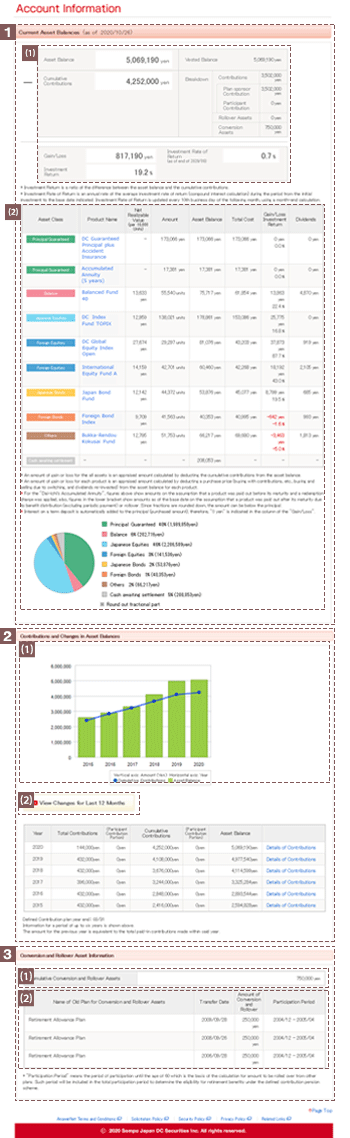
This section displays your account status as of the date indicated.
This sub-section displays asset balances, cumulative contributions, etc.
- Gain/loss
If an investment instructor bears an account maintenance fee for an individual- or corporate-type defined contribution plan, an amount of gain or loss after deducting the account maintenance fee is shown.
This information is not displayed for those currently receiving benefits. - Investment Return
Investment Return is a ratio of the difference between the asset balance and the cumulative contributions.
This information is not displayed for those currently receiving benefits. - Investment rate of return
Generally, investment rate of return is updated on the tenth business day of every month.
| The investment rate of return is not displayed for: | |
| 1) Those enrolled as participants in individual type defined contribution pension plans | |
2) Those enrolled in corporate type defined contribution pension plans if:
|
This sub-section displays asset balances, prices per unit, gain/loss, etc. for each investment products. The pie chart shows your asset balance as a proportion of your overall portfolio.
Click the name of an investment product to view details pertaining to that product.
- Gain/loss
If an investment instructor bears an account maintenance fee for an individual- or corporate-type defined contribution plan, an amount of gain or loss after deducting the account maintenance fee is shown.
This information is not displayed for those currently receiving benefits. - Investment Return
Investment Return is a ratio of the difference between the asset balance and the cumulative contributions.
This information is not displayed for those currently receiving benefits. - Dividends
Displays investment trust products only, "\0" is displayed for other products.

The table and graph show your yearly contributions and asset balances (for a maximum of six years).
Any refunds that have been dispersed are subtracted from contributions and asset balances.
Generally, it takes two business days after a contribution is received for this information to be reflected on AnswerNet.
Click this button to access section, the "Changes for Last 12 Months" screen.
Click this link to access the "Details of Contributions" screen.
(This information is displayed only in cases that involve conversion or rollover assets.)
This sub-section displays the total sum of cumulative conversion/rollover assets for which conversion has been completed and any rollover assets.
This sub-section displays the name of the plan from which conversion or rollover is performed, the rollover or conversion date, rollover or conversion amount, and other such details.
| * | If the plan from which assets are converted is indicated as "Defined Contribution Pension Plan, etc.", then transfer is deemed to have occurred from another defined contribution pension plan, the Employees’ Pension Fund, Pension Fund Association, or the new defined benefit plan due to early termination. |
|---|
(This information is displayed only in cases that involve installment payments from a retirement allowance plan.)
This sub-section displays the total amount of retirement allowance remaining from which installments have yet to be made.
This sub-section displays the scheduled date of conversion and conversion amounts.
It also displays the date of lump sum conversion and the amount of the lump conversion if, at the time participation eligibility is lost, Rollover/Asset Conversion are available from a lump-sum severance plan and assets remain to be distributed.
Click this button to access the "Rollover/Asset Conversion instructions" screen.
| * | Some of the items may not be displayed depending on the pension plan you participate in. |
|---|