
Request Forms (Mailing)
Input Details
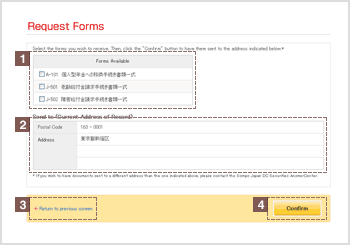
| * | Contents displayed represent samples. |
|---|
Select the check box ( )corresponding to the document you require.
This section displays your address that is currently registered with Sompo Japan DC Securities.
Please contact the AnswerCenter if you wish to have the form(s) sent to a different address.
Click on this to return to the "Request Documents" screen.
Click Confirm after verifying the information you have provided.
Verify Details
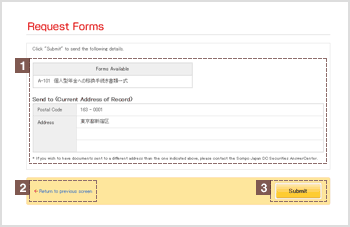
| * | Contents displayed represent samples. |
|---|
Verify that the information provided is accurate.
If any details need to be changed, click "Return to previous screen" and re-enter all required information.
Click Submit after verifying the information you have provided.
Request Submitted
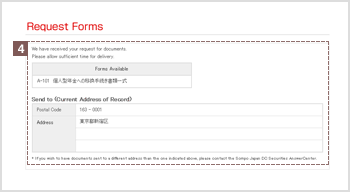
| * | Contents displayed represent samples. |
|---|
Once you have submitted your request for documents, information you have requested will be displayed.