
Contribution Instructions
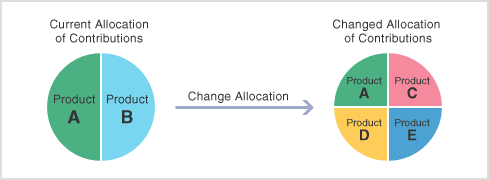
"Contribution Instructions" refer to providing or changing instructions for the way you would like future contributions to be allocated.
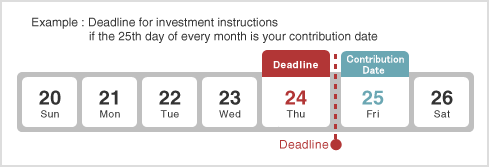
- An investment instruction received before 12:00 a.m. on the day prior to the upcoming contribution date will be reflected in the month when the next contribution is made.
- The investment instructions you have provided or changed will stay in effect for all future contributions, unless you change the way you would like these to be allocated.
- If you fail to complete investment instructions by the dead line of the first contribution, the contributions are managed in cash and can not be invested (uninstructed individual assets) .
STEP1:Provide Investment Instructions
| * | Contents displayed represent samples. |
|---|
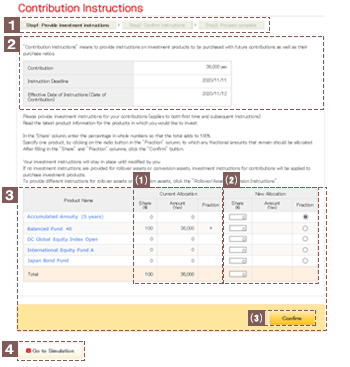
This section indicates what step you are currently at within the process of providing contribution instructions.
This section displays the contribution amount, the instruction deadline and the effective date of instructions (date of contribution).
Investment instructions provided after the deadline will be aplied to the next contribution and will stay in place until new investment instructions are provided.
This column displays investment allocations currently specified.
When specifying new investment allocations, the sum of the values that you enter in the "Share" column must total 100%.
Select the button ( ) in the "Fraction" column corresponding to the investment product to which you would prefer any remaining amount be added.
Click the name of an investment product to view details pertaining to that product.
Fractional amounts:
A fractional amount refers to any amount of less than one yen resulting when different investment products are allocated.
For example, if contributions of 10,005 yen are to be divided equally between two products, 50% to purchase product A and 50% to purchase product B, the total going to each of the products would be calculated as 5,002.5 yen. However, specifying product A in the "Fraction" column to receive the fractional amount, yields a final conversion at 5,003 yen for product A, and 5,002 yen for product B.
Click "Confirm" if the updated details specified are correct.
Click this button to access the "Simulation" screen. Please note this is available in Japanese only.
STEP2:Confirm Instructions
| * | Contents displayed represent samples. |
|---|
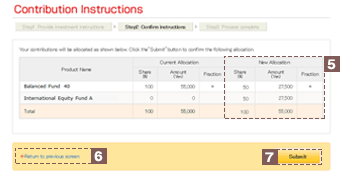
Verify the details you have specified.
If any details need to be changed, click "Return to previous screen" and re-enter all required information.
Click "Submit" after verifying the information you have provided.
| * | Contents displayed represent samples. |
|---|
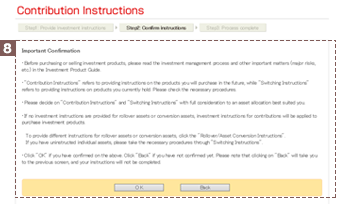
Click "Submit" to move to the confirmation screen. When providing new investment instructions, you are asked to confirm that you have read and understand the relevant investment product information.
Click "Yes" to indicate your consent that you have read and understand the investment product information.
| * | Please be aware that if you click "Back", you will return to the "STEP 2: Confirm instructions" screen, and investment instruction procedures will remain incomplete. |
|---|
STEP3:Process Complete
| * | Contents displayed represent samples. |
|---|
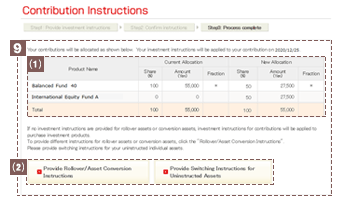
Once you have completed the three steps involved in specifying contribution instructions, current and new investment allocations will be shown.
Reverting back to earlier investment instructions requires that you once again enter previous values.
Each button will be displayed only for those who are able to provide instructions for applicable assets.
Note:
This information is displayed only for those who are able to provide instructions for contributions.