
STEP4 Confirm STEP5 Transaction Complete
STEP4:Confirm
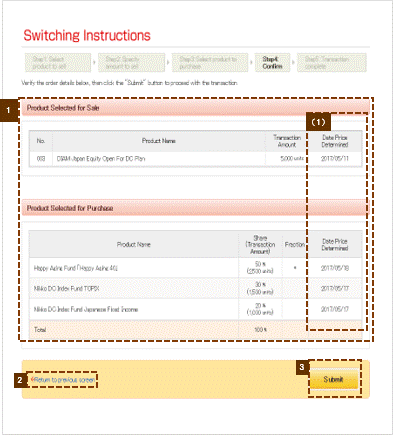
1Confirm details of transaction
(1) Glossary related to switching
Confirm details that you have provided for the switching transaction.

2"Return to previous screen" link
To revise details for the switching transaction click "Return to previous screen" and re-enter all required information.
3"Submit" button
Verify the information you have provided, then click Submit.
STEP5: Transaction Complete
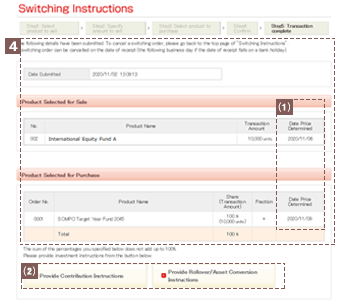
4Transaction Complete
(1) Glossary related to switching
(2)"Contribution Instructions" and "Provide Rollover/Asset Conversion Instructions" buttons
Once you have completed the steps involved in specifying instructions for switching transactions, you will see the message, "You have submitted the following details." along with the switching instructions you have submitted.
Each button will be displayed only for those who are able to provide instructions for applicable assets.