
Switching Instructions
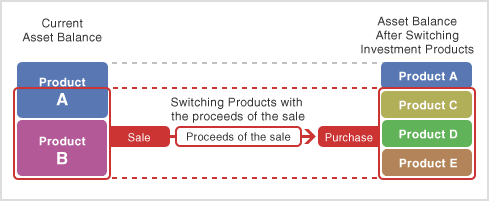
"Switching Instructions" refer to selling the investment products currently held in your account and purchase of other investment products from the proceeds of the sale.
- A request for switching instructions received before 12:00 a.m. on the day the request is received is reflected on the following business day. (Note: The request will be processed two business days following the receipt date if the date of receipt falls on a weekend or public holiday.)
- The Net Asset Value (Net realizable value) changes everyday even during the settlement of transactions. This means that the actual execution price may be different than the price at the time you placed the order.
- The products you have purchased in a switching transaction can not be sold until the transaction has settled. (Exception: Any portion of a product you already hold, which is not part of the switching transaction.)
- Limit orders based on price or date cannot be accepted for switching transactions.
Reference :Schedule of Switching Instructions
- Nearly 7 business days will be required from application (date received) to completion (settlement date).

| ※ | Contents displayed represent samples. |
|---|
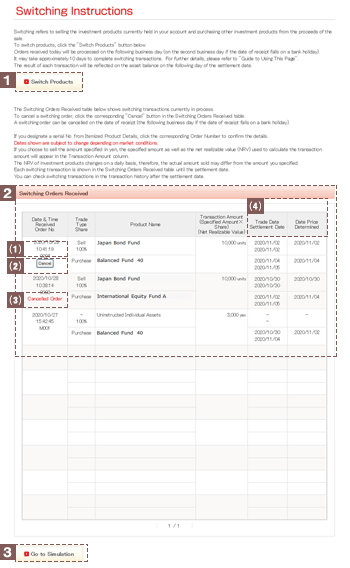
Click this button to access the "Products Available for Sale" screen.
This section displays a list of instructions for switching transactions you have submitted that are currently in process. Here you can confirm details such as the date switching instructions were submitted, investment product names, number of units sold, trade date, settlement date and date price determined.
This information is displayed until respective switching transactions have been finalized.
After transactions specifying the sale of itemized investment products have been submitted, click an order number to access the switching instruction reference screen where you can view details of the respective switching transaction.
Your request can be canceled on the date of receipt (by the following business day if the date of receipt falls on a financial institution holiday)(see Note below). Note: The cancellation deadline may be earlier for some transactions. After clicking Cancel, you will be directed to a verification screen. Even if you select to purchase several products at one Switching, you need to cancel each product you purchased. ( You will not be able to cancel more than one product at once.)
The label "Cancelled Order" is displayed next to switching transactions that have been cancelled.
Transactions that have been cancelled no longer appear in the list the day following transaction cancellation.

Click this button to access the "Simulation" screen (This is available only in Japanese).