
STEP1 Select product to sell
| ※ | Contents displayed represent samples. |
|---|
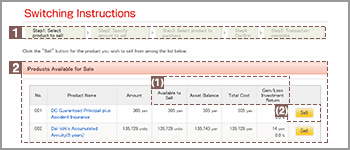
1Progress toward completion of the transaction
This section indicates what step you are currently at in the switching process.
2Products Available for Sale
(1) Glossary related to Switching
(2) "Sell" button
This section displays a list of investment products in your portfolio that you may elect to sell.
Click the name of an investment product to view details pertaining to that product.

Click "Sell" to sell the selected investment product.
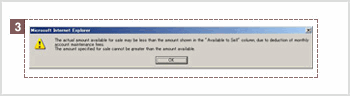
Balance available for Switching
3Balance available for Switching
When moving to the “Step1” screen, the above message may appear.
You may not be able to sell the entire balance in cases where monthly account maintenance fees need to be deducted. Click “OK” then “sell” to go to “Step2” screen, enter an amount up to the “Current balance available for sale” shown at the bottom of the Product Selected for Sale screen.