
STEP2 Specify amount to sell
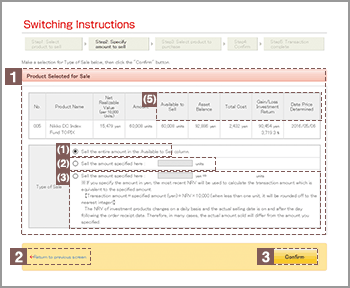
Click the option button ( ) next to one of the three selling instructions.
Sell all amount indicated in the "Available to Sell" column.
Enter the number of units you wish to sell.
Enter the amount in yen you wish to sell.
※If you specify the amount in yen, the most recent NRV will be used to calculate the transaction amount which is equivalent to the specified amount.
【Transaction amount=specified amount (yen)÷NRV×10,000 (when less than one unit, it will be rounded off to the nearest integer)】
The NRV of investment products changes on a daily basis and the actual selling date is on and after the day following the order receipt date. Therefore, in many cases, the actual amount sold will differ from the amount you specified.
You may select individual portions of any term deposit and/or insurance products from your portfolio. This option is available only if your portfolio contains term deposit and/or insurance products.

If any details need to be revised, click "Return to previous screen" and re-enter all required information.
Click Confirm after verifying the information you have provided.