
STEP3 Select products to purchase
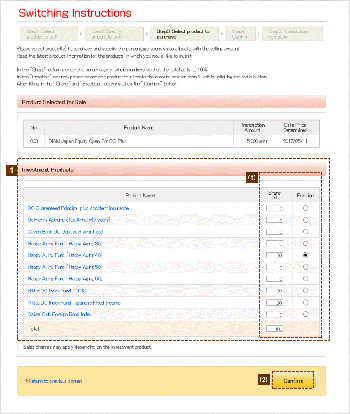
Please select purchasing product(s) and put percentage as a total of 100% in the "Share" column. Specify one product, by clicking on the radio button in the "Fraction" column. Click the name of an investment product (in blue letters) to view details. Fractional amounts: A fractional amount refers to any amount of less than one yen resulting when different investment products are allocated. For example, if contributions of 10,005 yen are to be divided equally between two products, 50% to purchase product A and 50% to purchase product B, the total going to each of the products would be calculated as 5,002.5 yen. However, specifying product A in the "Fraction" column to receive the fractional amount, yields a final conversion at 5,003 yen for product A, and 5,002 yen for product B.
Verify the information you have provided, then click Confirm.
| * | Contents displayed represent samples. |
|---|
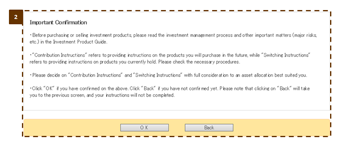
Click "Submit" to move to the confirmation screen. When performing a switching transaction, you are asked to confirm that you have read and understand the relevant investment product information.
Click "Yes" to indicate your consent that you have read and understand the investment product information.
| ※ | Please be aware that if you click "Back", you will return to the "STEP 3: Select products to purchase" screen, and switching instruction procedures will remain incomplete. |
|---|